MP3 Cutter 1.1
Updated on 02 Apr 2012
By Anthony Buckner
By Anthony Buckner
Specifications
License:
Demo (Free to try)
Updated:
Downloads:
3902
Platform:
Windows (All Versions)
Publisher:
mp3cutter.org(more)
Website:
User Reviews:
Other versions:
1.2
Do you like
MP3 Cutter?
MP3 Cutter?
FindMySoft Editor's Review
MP3 Cutter - Extract fragments from audio files
The best way to get custom ringtones is to cut audio files. It can be done fast, and you can extract any segment of an audio file. Finding software for cutting audio files is not hard, but it can be if you are looking for one which is more reliable. MP3 Cutter offers no more and no less than you need. You can use it to cut audio files right away, with only a few clicks of the mouse.
To install the software, you will have to download a 2.48 Mb package and run it. The installation process will start after going through a few standard steps like setting an installation path and creating shortcuts. Due to low system requirements, MP3 Cutter will not slow down your computer and you can run it on most Windows versions.
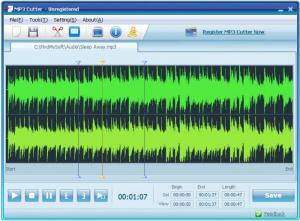
You will not find too many settings on MP3 Cutter's interface. Once an audio file is loaded, it will be displayed as two sound waves (left and right channels), on the main area of the window. Among the playback options, beneath the sound waves, you will find options for selecting a start and an end position on the audio track. After clicking one of these buttons, the start or end position can be set by simply clicking the sound waves.
The entire soundtrack or the selection you make can be played at any time, and you can jump to any position on the track by clicking on the sound waves. A random segment can be selected instantly by clicking the Random Cutter on the toolbar. If you are not satisfied with the selection, you can always adjust it by clicking and dragging the start and end markers.
After selecting an audio segment, the only thing left to do is to export it by clicking the Save button in the lower right corner of the interface. While selecting a destination folder, you can also choose the file's output format (MP3, WMA, WAV or AMR). The output formats may not seem so many, but the software compensates this with the fact that it can support over 40 formats for input.
Pros:
MP3 Cutter is lightweight and it lets you cut and save audio files immediately. The best part is that you can load files in over 40 different formats, so you can also use it as a converter.
Cons:
It would have been more useful if there had been more than four formats available for saving files.
With MP3 Cutter, you can cut any segment of an audio track and save it immediately. The interface's straightforward design lets you perform this task with only a few clicks.
To install the software, you will have to download a 2.48 Mb package and run it. The installation process will start after going through a few standard steps like setting an installation path and creating shortcuts. Due to low system requirements, MP3 Cutter will not slow down your computer and you can run it on most Windows versions.
You will not find too many settings on MP3 Cutter's interface. Once an audio file is loaded, it will be displayed as two sound waves (left and right channels), on the main area of the window. Among the playback options, beneath the sound waves, you will find options for selecting a start and an end position on the audio track. After clicking one of these buttons, the start or end position can be set by simply clicking the sound waves.
The entire soundtrack or the selection you make can be played at any time, and you can jump to any position on the track by clicking on the sound waves. A random segment can be selected instantly by clicking the Random Cutter on the toolbar. If you are not satisfied with the selection, you can always adjust it by clicking and dragging the start and end markers.
After selecting an audio segment, the only thing left to do is to export it by clicking the Save button in the lower right corner of the interface. While selecting a destination folder, you can also choose the file's output format (MP3, WMA, WAV or AMR). The output formats may not seem so many, but the software compensates this with the fact that it can support over 40 formats for input.
Pros:
MP3 Cutter is lightweight and it lets you cut and save audio files immediately. The best part is that you can load files in over 40 different formats, so you can also use it as a converter.
Cons:
It would have been more useful if there had been more than four formats available for saving files.
With MP3 Cutter, you can cut any segment of an audio track and save it immediately. The interface's straightforward design lets you perform this task with only a few clicks.
Do you like MP3 Cutter
Quick Look VideoNew
Popular News
As of yesterday, March 23, Yahoo! can boast that it has its own web browser: Yahoo! Axis.
A week after the RC, the final edition of Linux Mint 13 codename Maya has been released.
MP3 Cutter Awards
MP3 Cutter Editor's Review Rating
MP3 Cutter has been reviewed by Frederick Barton on
02 Apr 2012. Based on the user interface, features and complexity, Findmysoft has rated
MP3 Cutter
5
out of 5 stars, naming it EssentialYour Rating
Top Downloads
2.
Opera5.
Trillian8.
AIM9.
Skype10.
Ad-Aware12.
Nero13.
Google Earth14.
Picasa15.
Winamp16.
iTunes17.
RealPlayer18.
uTorrent19.
eMule20.
WinRAR21.
BitComet22.
WinZip23.
Shareaza24.
CCleaner25.
Recuva26.
Tweak UI27.
CuteFTP Home29.
Adobe Reader30.
NewsPiperBecome A Fan!
Link To Us!
MP3 Cutter
HTML Linking Code
HTML Linking Code
Latest Reviews